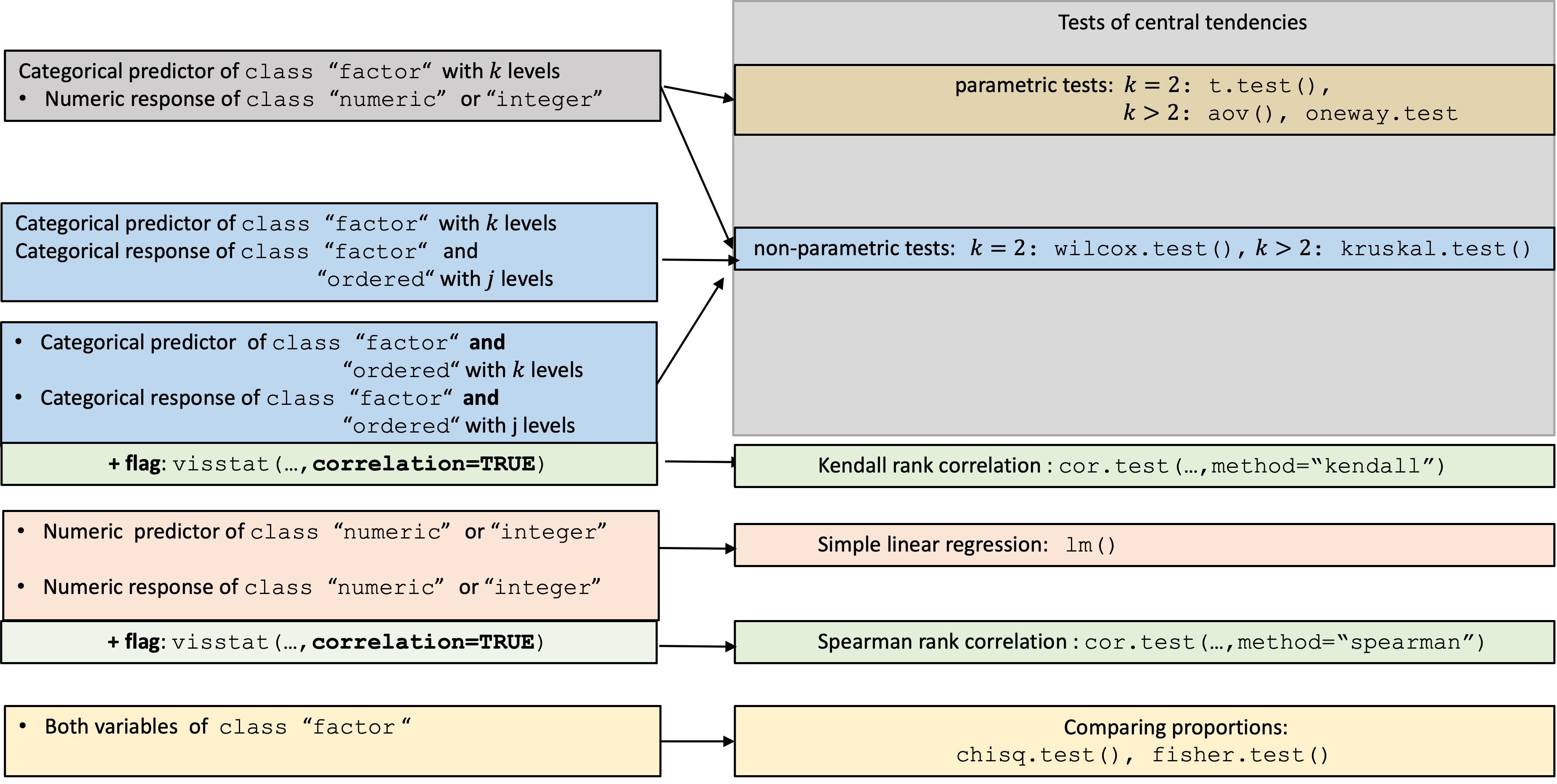
Overview of the implemented statistical tests based on the class of the variables.
visStatistics is an R package for automated statistical
test selection and visualisation. It selects appropriate hypothesis
tests for pairs of variables (integer, numeric, or factor), runs the
analysis, and produces annotated, publication-ready plots.
The package was originally developed for researchers who could not directly access sensitive data but needed to perform visualisations and statistical analyses of selected groups via a web interface connected to a protected database — a setting that required a fully automated workflow. The same automation makes it useful in time-constrained contexts such as statistical consulting, where it reduces effort spent on test selection and leaves more room for interpretation. The package covers most hypothesis tests taught in undergraduate statistics.
install.packages("visStatistics")library(visStatistics)devtools from CRAN if not already installed:install.packages("devtools")devtools
package:library(devtools)visStatistics package from GitHub:pak::pak("shhschilling/visStatistics")visStatistics package:library(visStatistics)? visstatvignette("visStatistics")The function visstat() accepts input in three ways:
# Standardised form:
visstat(x, y)

# Formula interface:
visstat(y ~ x, data = df)


# Backward-compatible form:
visstat(dataframe, "namey", "namex")
In the standardised form, x and y must be
vectors of class "numeric", "integer", or
"factor".
In the formula interface, the formula y ~ x specifies
the response y and predictor x variables, and
data is a data frame containing these variables.
In the backward-compatible form, "namex" and
"namey" must be character strings naming columns in a
data.frame named dataframe. These column must
be of class "numeric", "integer", or
"factor". This is equivalent to writing:
visstat(dataframe[["namex"]], dataframe[["namey"]])To simplify the notation, throughout the remainder, data of class
numeric or integer are both referred to by
their common mode numeric,
while data of class factor are referred to as
categorical.
The interpretation of x and y depends on
their classes:
If one is numeric and the other is a factor, the numeric must be
passed as response y and the factor as predictor
x. This supports tests for central tendencies.
If both are numeric, a simple linear regression model is fitted
with y as the response and x as the
predictor.
If both are factors (and not both ordered), a test of association
is performed (Chi-squared or Fisher’s exact). The test is symmetric, but
the plot layout depends on which variable is supplied as
x.
If both are factors and y is additionally of class
ordered, a non parametric test is performed: a Wilcoxon
test in the case of two factor levels in x, a
Kruskal-Wallis-Test for more than two factor levels in
x.
If both x and y are of
class ordered, the order of the levels carries information
that Chi-squared / Fisher would discard. visstat() instead
tests for a monotone association via Kendall’s \(\tau_b\)
(cor.test(..., method = "kendall")) and visualises the
relationship with a jittered rank–rank scatter plus a mosaic
plot.
The choice of statistical tests depends on whether the data of the
selected columns are numeric or categorical, the number of levels in the
categorical variable, and the distribution of the data.
For a detailed description of the underlying decision logic, please
refer to the package vignette:
vignette("visStatistics")Below figure gives a graphical overview of the main tests implemented.
Overview of the implemented statistical tests based on the class of the variables.
A graphical summary of the decision logic used for categorial predictors and numerical responses resulting in tests of central tendencies is given in below figure:
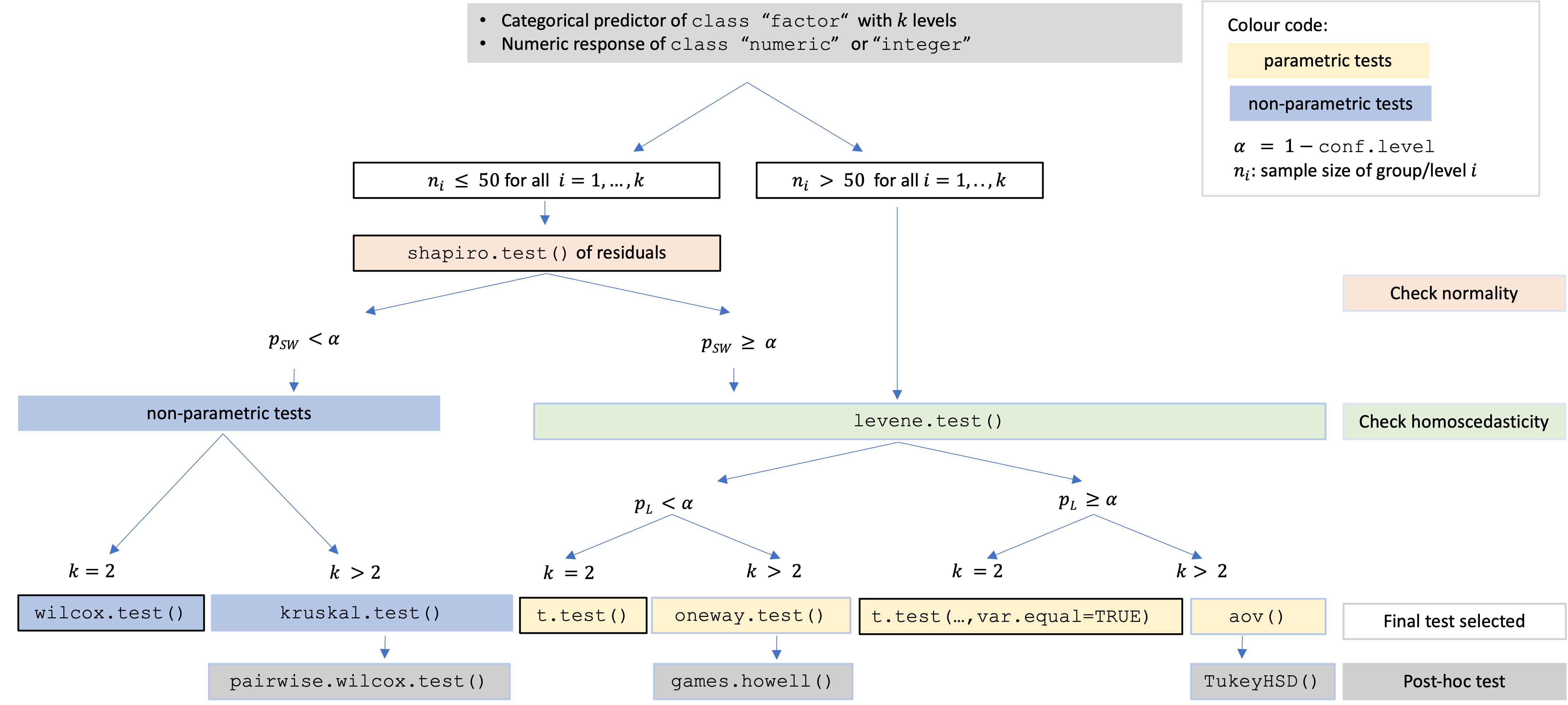
Comparing central tendencies: Decision tree used to select the appropriate statistical test for a categorical predictor and numeric response, based on the number of factor levels, normality, and homoscedasticity.
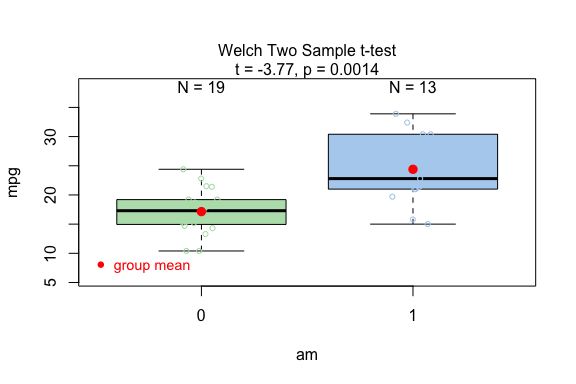
library(visStatistics)When the response is numerical and the predictor is categorical, test of central tendencies are selected.
 mtcars$am <- as.factor(mtcars$am)
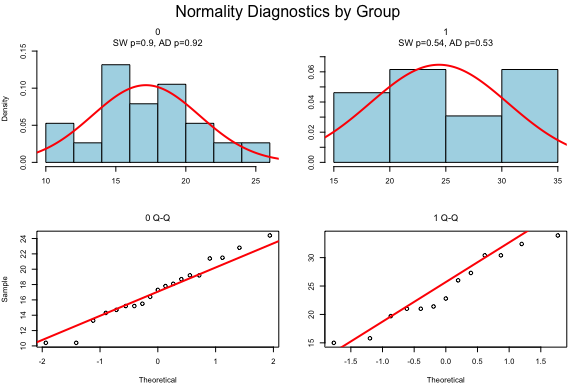
 t_test_statistics <- visstat(mtcars$am, mtcars$mpg)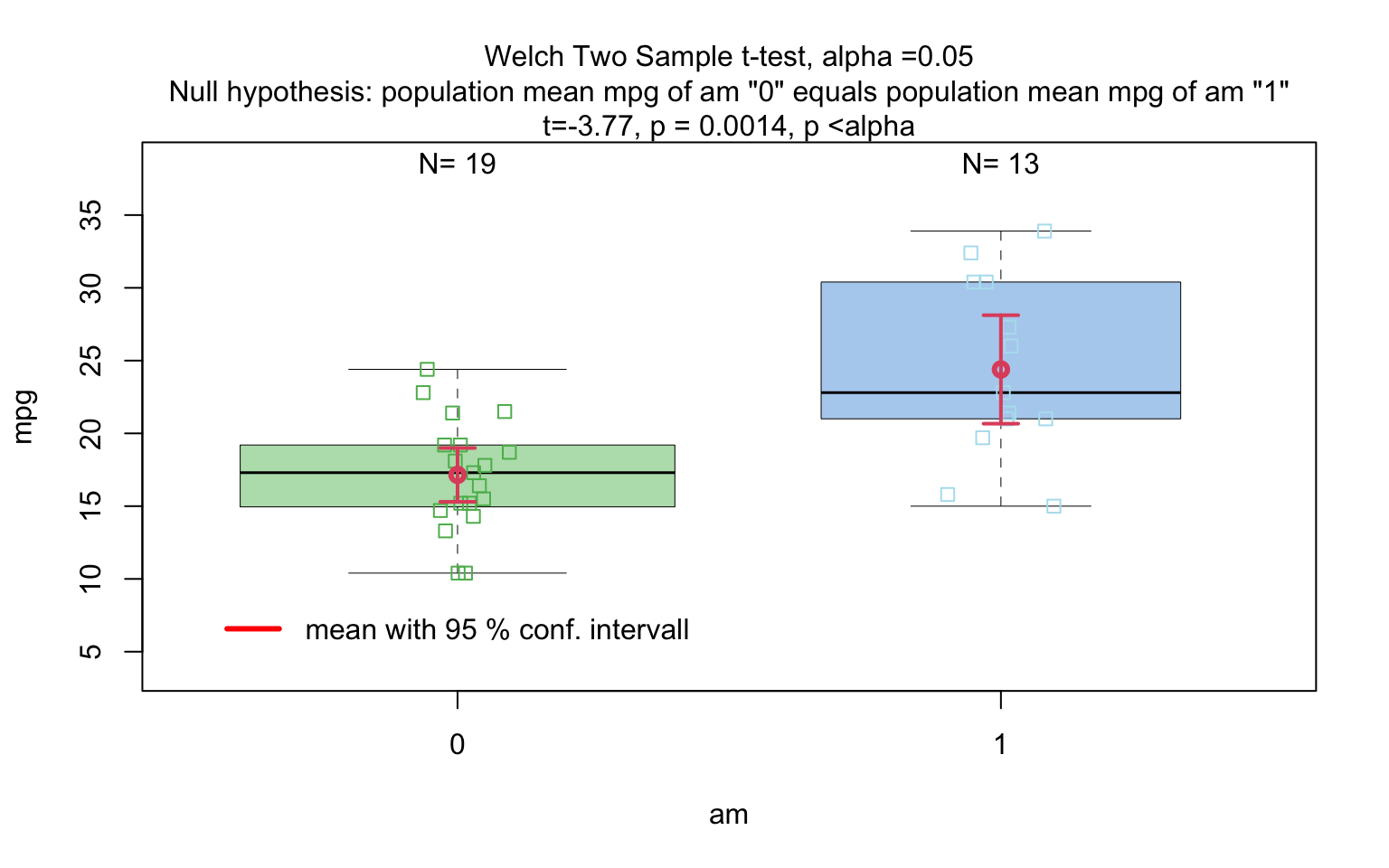
grades_gender <- data.frame(
  sex = factor(rep(c("girl", "boy"), times = c(21, 23))),
  grade = c(
    19.3, 18.1, 15.2, 18.3, 7.9, 6.2, 19.4, 20.3, 9.3, 11.3,
    18.2, 17.5, 10.2, 20.1, 13.3, 17.2, 15.1, 16.2, 17.0, 16.5, 5.1,
    15.3, 17.1, 14.8, 15.4, 14.4, 7.5, 15.5, 6.0, 17.4, 7.3, 14.3,
    13.5, 8.0, 19.5, 13.4, 17.9, 17.7, 16.4, 15.6, 17.3, 19.9, 4.4, 2.1
  )
)

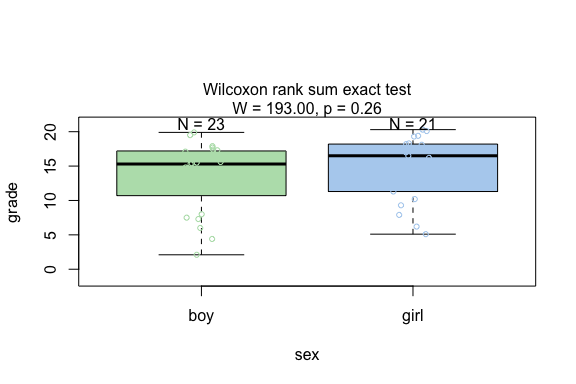
wilcoxon_statistics <- visstat(grades_gender$sex, grades_gender$grade)
fisher_one_way_npk <- visstat(npk$block,npk$yield)

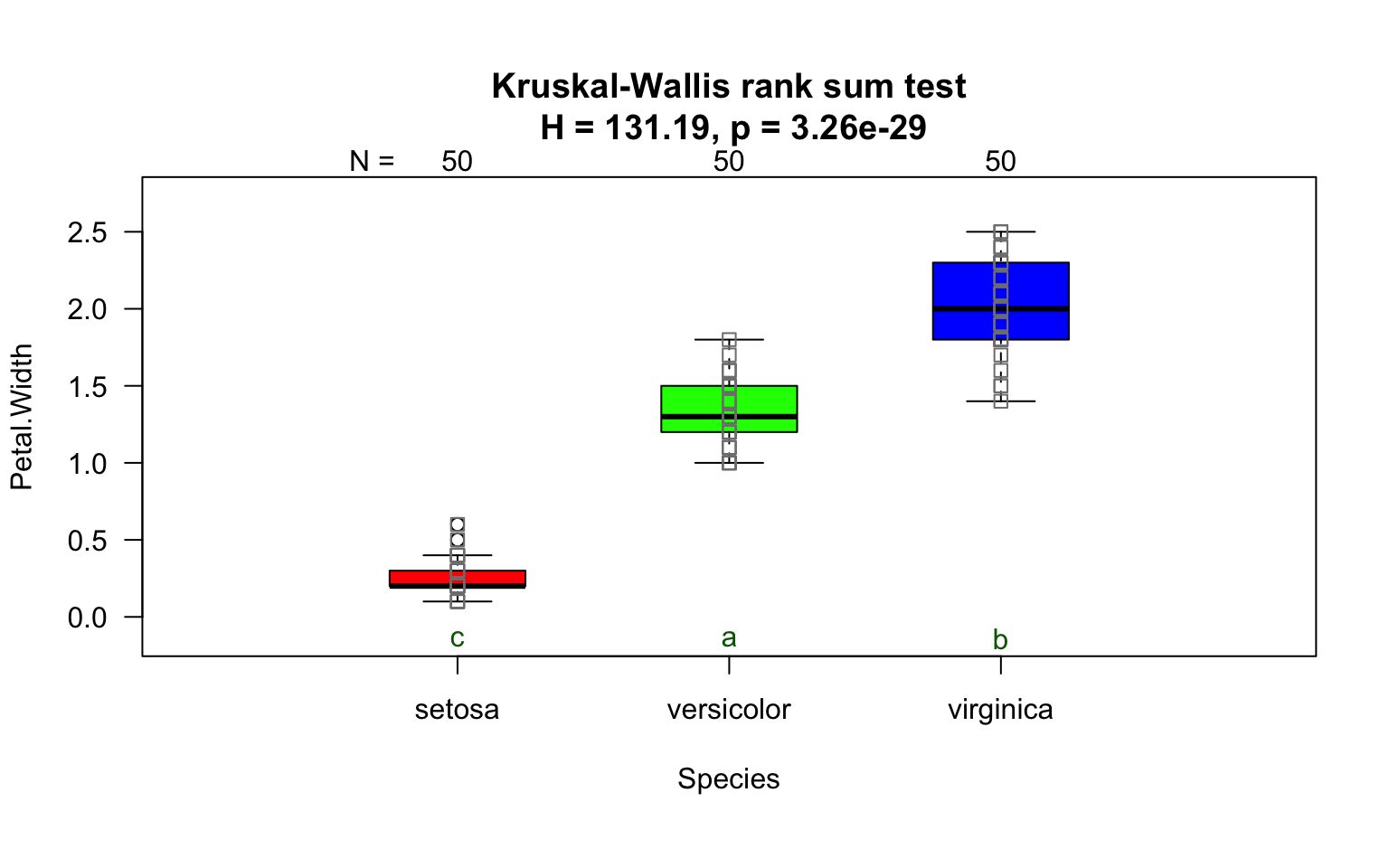
kruskal_iris=visstat(iris$Species, iris$Petal.Width)
A response variable of classes ordered and
factor is internally transformed to a numeric
response and Wilcoxon test is performed for a predictor with two
classes, otherwise a Kruskal-Wallis-Test.
set.seed(123)

# Create predictor: Customer segment (2 groups)
segment <- factor(rep(c("Budget", "Premium"), each = 50))

# Create response: Likert scale ratings (1-5)
satisfaction_numeric <- c(
  sample(1:5, 50, replace = TRUE, prob = c(0.15, 0.25, 0.30, 0.20, 0.10)),  # Budget
  sample(1:5, 50, replace = TRUE, prob = c(0.05, 0.10, 0.20, 0.35, 0.30))   # Premium
)

# Create dataframe with ORDERED response
survey_data <- data.frame(
  segment = segment,
  satisfaction = ordered(satisfaction_numeric)  # Declare as ordered
)

# triggers warnings and use Wilcoxon test
result <- visstat(survey_data$segment,survey_data$satisfaction)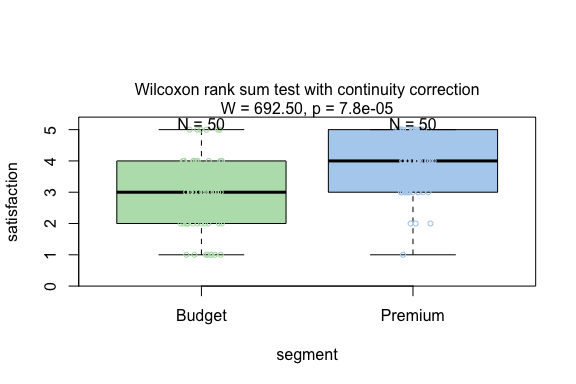
set.seed(123)

# Create predictor: Service class (3 groups)
service_class <- factor(rep(c("Economy", "Business", "First"), each = 50))

# Create response: Likert scale ratings (1-5)
comfort_numeric <- c(
  sample(1:5, 50, replace = TRUE, prob = c(0.35, 0.30, 0.20, 0.10, 0.05)),  # Economy
  sample(1:5, 50, replace = TRUE, prob = c(0.10, 0.20, 0.35, 0.25, 0.10)),  # Business
  sample(1:5, 50, replace = TRUE, prob = c(0.05, 0.10, 0.20, 0.30, 0.35))   # First
)

# Create dataframe with ordered response
flight_data <- data.frame(
  service_class = service_class,
  comfort = ordered(comfort_numeric)  # Declare as ordered
)

# triggers warning and uses Kruskal-Wallis test
result <- visstat(flight_data$service_class, flight_data$comfort)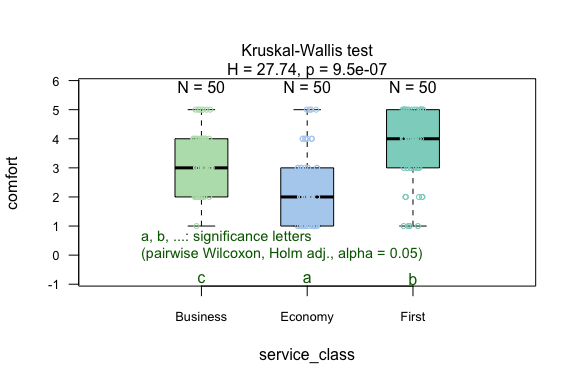
vis_women <- visstat(women$height, women$weight,conf.level=0.99)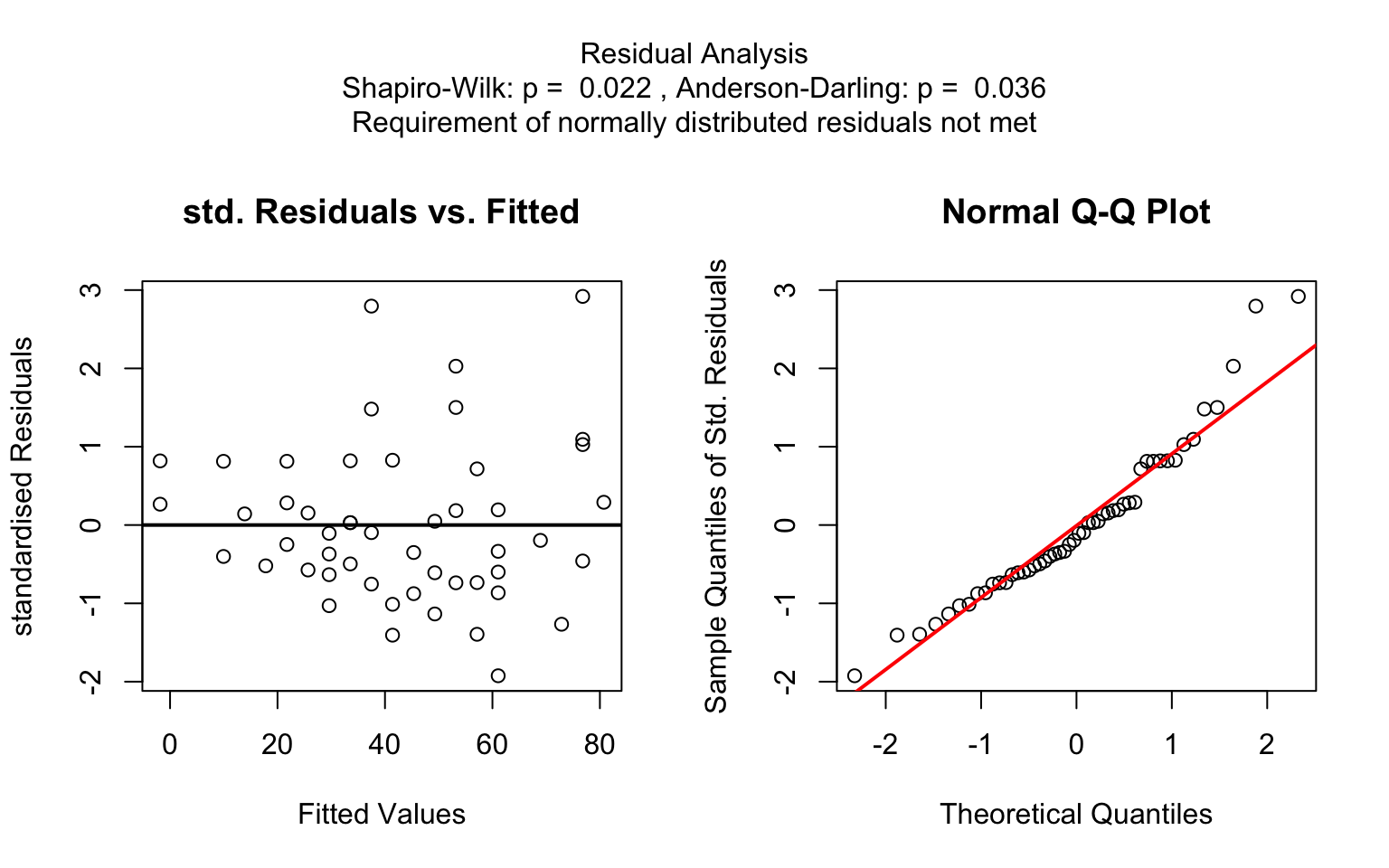
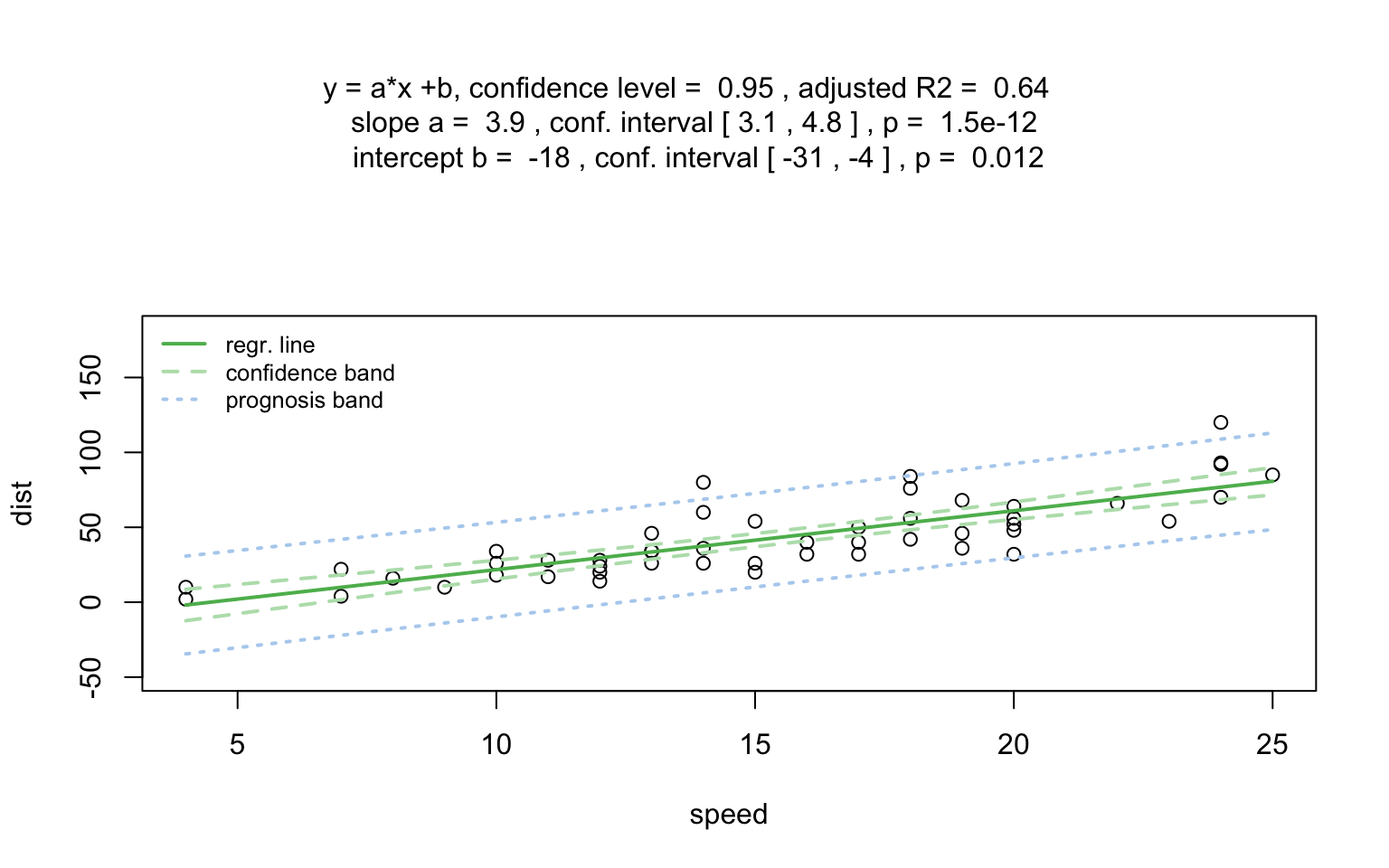
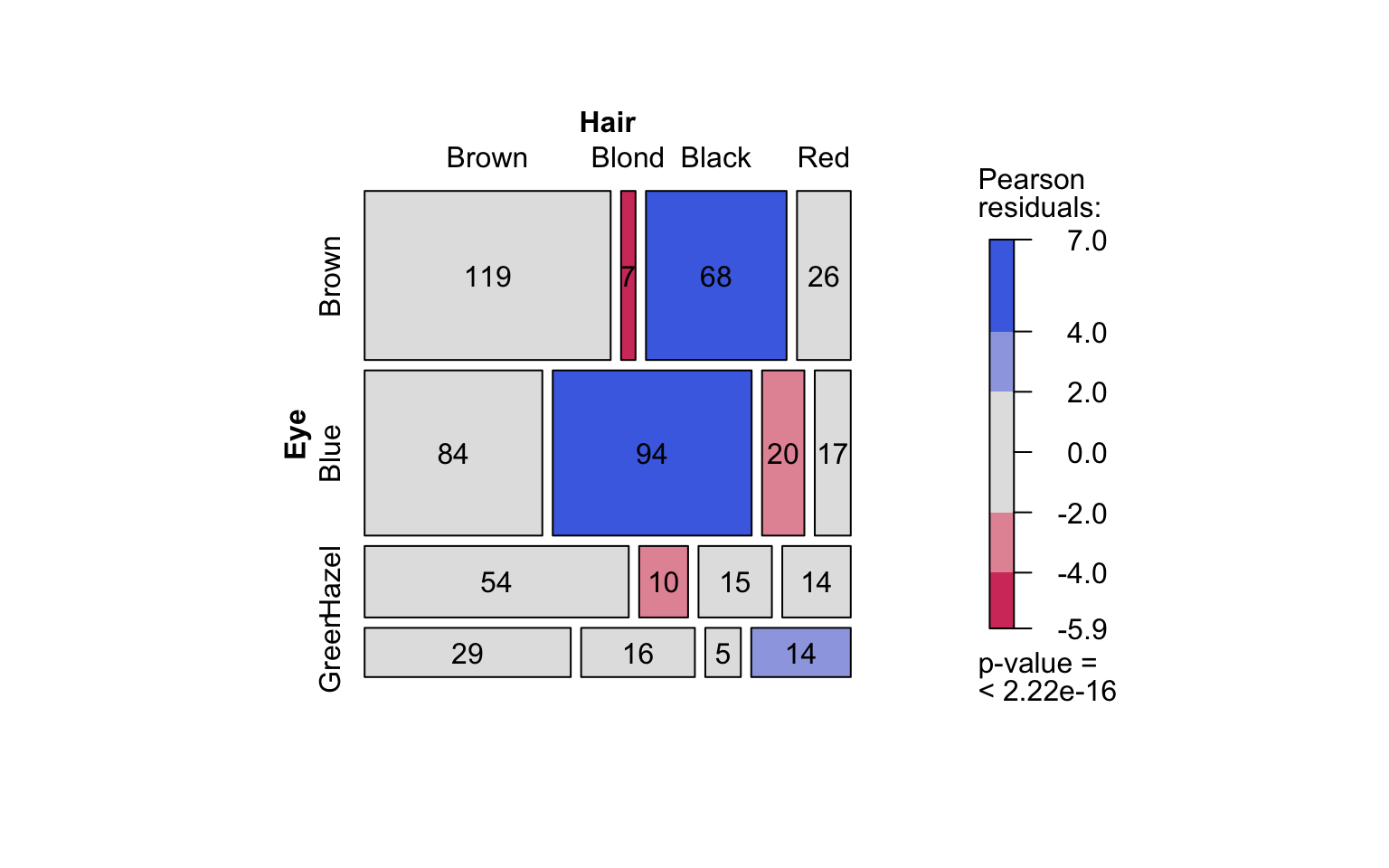
Count data sets are often presented as multidimensional arrays, so -
called contingency tables, whereas visstat() requires a
data.frame with a column structure. Arrays can be
transformed to this column wise structure with the helper function
counts_to_cases():
hair_eye_color_df <- counts_to_cases(as.data.frame(HairEyeColor))
visstat(hair_eye_color_df$Eye, hair_eye_color_df$Hair)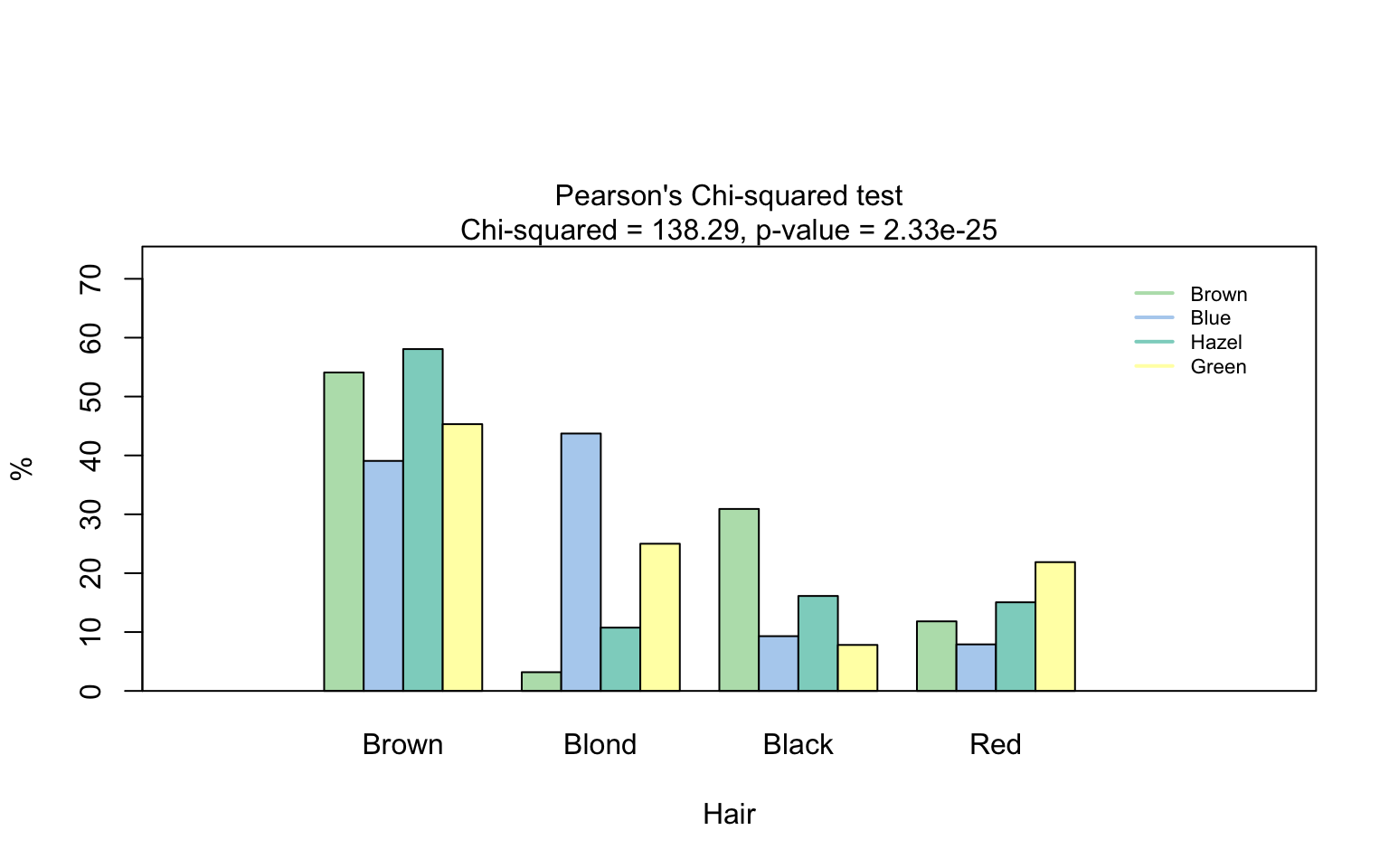
hair_eye_color_male <- HairEyeColor[, , 1]
# Slice out a 2 by 2 contingency table
black_brown_hazel_green_male <- hair_eye_color_male[1:2, 3:4]
# Transform to data frame
black_brown_hazel_green_male <- counts_to_cases(as.data.frame(black_brown_hazel_green_male))
# Fisher test
fisher_stats <- visstat(black_brown_hazel_green_male$Eye,black_brown_hazel_green_male$Hair)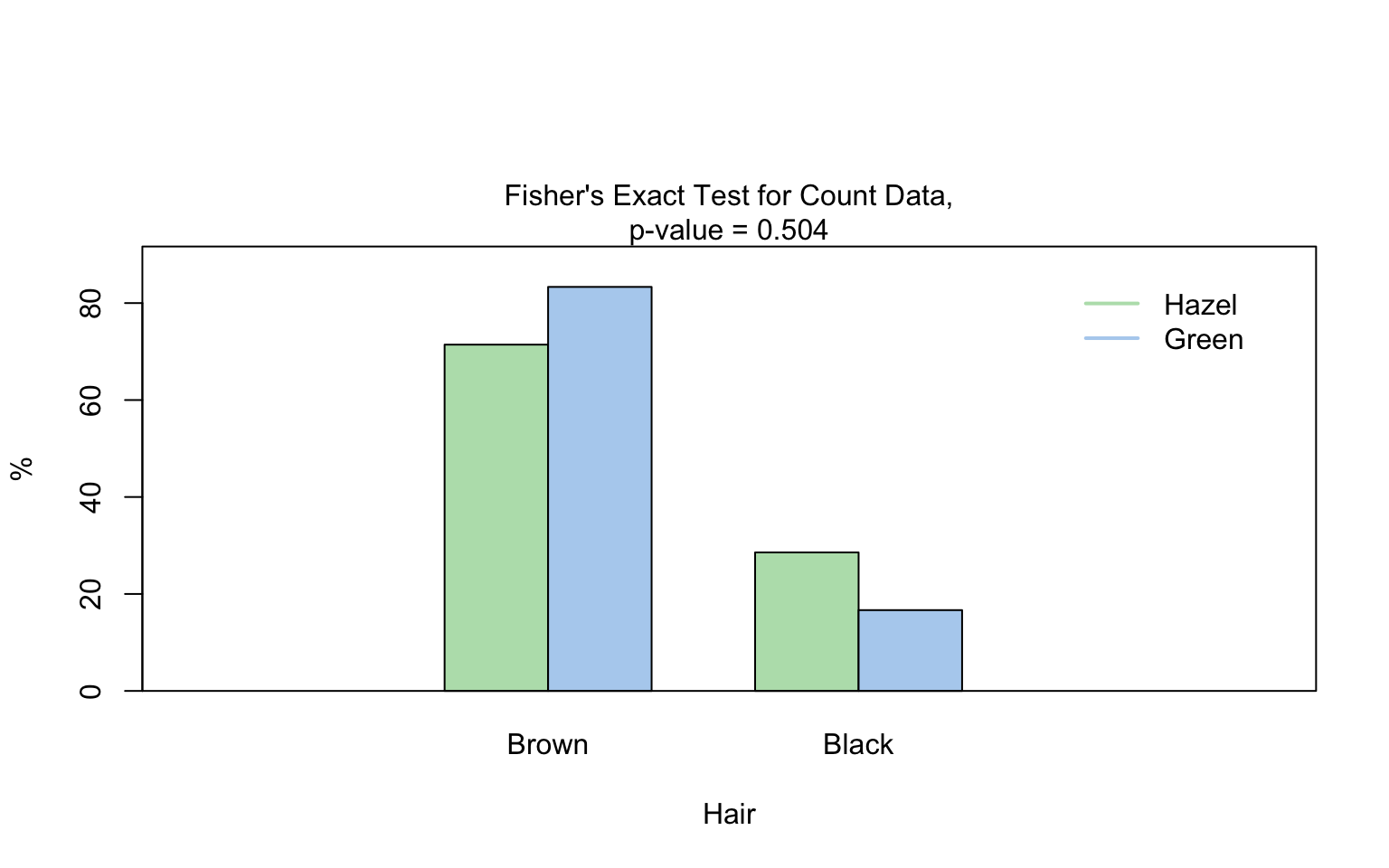
When both predictor and response are of class ordered,
visstat() tests for a monotone association via Kendall’s
\(\tau_b\) and produces a jittered
rank–rank scatter together with a mosaic plot.
set.seed(1)
n <- 120
xs <- sample(1:5, n, replace = TRUE)
ys <- pmin(5, pmax(1, xs + sample(-1:1, n, replace = TRUE)))
likert_levels <- c("strongly disagree", "disagree", "neutral",
                   "agree", "strongly agree")
attitude  <- ordered(likert_levels[xs], levels = likert_levels)
intention <- ordered(likert_levels[ys], levels = likert_levels)
kendall_result <- visstat(intention, attitude)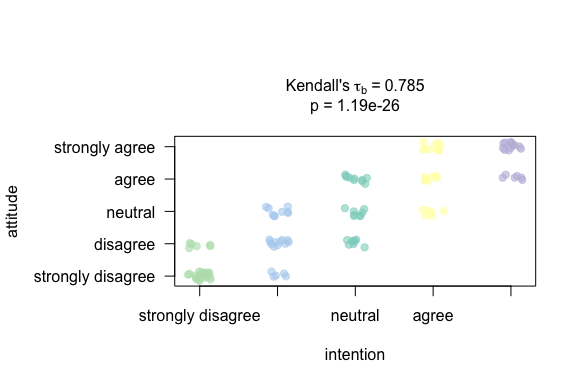
All generated graphics can be saved in any file format supported by
Cairo(), including “png”, “jpeg”, “pdf”, “svg”, “ps”, and
“tiff” in the user specified plotDirectory.
If the optional argument plotName is not given, the
naming of the output follows the pattern
"testname_namey_namex.", where "testname"
specifies the selected test or visualisation and "namey"
and "namex" are character strings naming the selected data
vectors y and x, respectively. The suffix
corresponding to the chosen graphicsoutput (e.g.,
"pdf", "png") is then concatenated to form the
complete output file name.
In the following example, we store the graphics in png
format in the plotDirectory tempdir() with the
default naming convention:
#Graphical output written to plotDirectory: In this example
# a bar chart to visualise the Chi-squared test and mosaic plot showing
# Pearson's residuals named
#chi_squared_or_fisher_Hair_Eye.png and mosaic_complete_Hair_Eye.png resp.
save_fisher <- visstat(black_brown_hazel_green_male, "Hair", "Eye",
        graphicsoutput = "png", plotDirectory = tempdir())
The full file path of the generated graphics are stored as the
attribute "plot_paths" on the returned object of class
"visstat".
paths <- attr(save_fisher, "plot_paths")
print(paths)
#> [1] "/var/folders/5c/n85wqnh95l50qbp3s9l0rp_w0000gn/T//RtmptoHBnl/chi_squared_or_fisher_Hair_Eye.png"
Remove the graphical output from plotDirectory:
file.remove(paths)
#> [1] TRUE