


MultiModalR performs Bayesian mixture modeling for multimodal data. It detects subpopulations and assigns probabilistic memberships using two advanced Markov Chain Monte Carlo (MCMC) algorithms implemented in optimized C++:
Metropolis-Hastings within Gibbs Sampler for Gaussian Mixture Models - Fast and robust
Dirichlet-Multinomial (collapsed Gibbs) - Slower and rigorously robust
Rcpp, RcppArmadillo, dplyr,
furrr, future
# From CRAN (recommended)
install.packages("MultiModalR")

# Development version from GitHub
devtools::install_github("DijoG/MultiModalR")library(MultiModalR)
# Load data
df <- MultiModalR::multimodal_dummy
# Run analysis with default settings
results <- fuss_PARALLEL_mcmc(
data = df,
varCLASS = "Category",
varY = "Value",
varID = "ID"
)
# View results summary
summary(results)MultiModalR::fuss_PARALLEL_mcmc(
data = df, # 📦 -> required
varCLASS = "Category", # 🏷️ -> required
varY = "Value", # 📈 -> required
varID = "ID", # 🆔 -> required
method = "sj-dpi", # 📏 /default
within = 1, # 🎯 /default
maxNGROUP = 5, # 🔢 /default
out_dir = ".../output", # 💾 -> optional
n_workers = 3, # ⚡ /default
n_iter = NULL, # 🔄 /default
burnin = NULL, # 🔥 /default
proposal_sd = 0.15, # 📊 /default
sj_adjust = 0.5, # ⚖️ /default
mcmc_method = "metropolis", # 🧮 /default
dirichlet_alpha = 2.0 # 🎲 /default
)library(MultiModalR)
# Load the built-in dataset
df <- MultiModalR::multimodal_dummy
# View the data structure
head(df)
str(df)library(ggplot2)
# Plot 01 ~ subpopulations/subgroups not shown
ggplot(df, aes(x = Value)) +
geom_density(color = NA, fill = "grey98", adjust = .8) +
facet_wrap(~Category) +
theme_dark() +
labs(title = "Multimodal Data ~ Density",
x = "Value", y = "Density") +
scale_y_continuous(expand = expansion(mult = c(0, 0))) +
scale_x_continuous(expand = expansion(mult = c(0, 0))) +
theme(legend.position = "top",
axis.text.y = element_blank(),
axis.ticks = element_blank(),
panel.grid.major = element_blank(), panel.grid.minor = element_blank(),
plot.title = element_text(hjust = .5))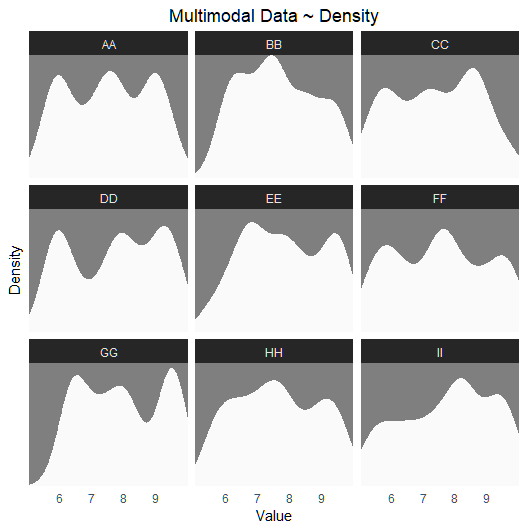
# Plot 02 ~ subgroups shown
ggplot(df, aes(x = Value, fill = Subpopulation)) +
  geom_density(alpha = 0.5, color = NA) +
  scale_fill_manual(values = c("firebrick2", "forestgreen", "cyan3"),
                     name = "Subgroups") +
  facet_wrap(~Category) +
  theme_dark() +
  labs(title = "Multimodal Data ~ Density with Subgroups",
       x = "Value", y = "Density") +
  scale_y_continuous(expand = expansion(mult = c(0, 0))) +
  scale_x_continuous(expand = expansion(mult = c(0, 0))) +
  theme(legend.position = "top",
        legend.key = element_rect(fill = "transparent", color = NA),
        axis.text.y = element_blank(),
        axis.ticks = element_blank(),
        panel.grid.major = element_blank(), panel.grid.minor = element_blank(),
        plot.title = element_text(hjust = .5)) +
  guides(fill = guide_legend(override.aes = list(alpha = .6)))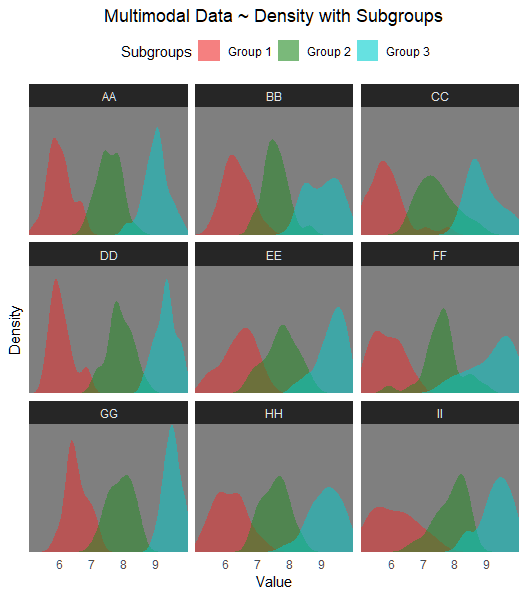
# Configure parallel processing
cores <- 3# Dirichlet MCMC
MultiModalR::fuss_PARALLEL_mcmc(
data = df,
varCLASS = "Category",
varY = "Value",
varID = "ID",
out_dir = "D:/MultiModalR/test",
n_workers = cores,
mcmc_method = "dirichlet"
)
tictoc::toc()
# Processing time: 5.19 sec (3 cores) ~ 91.4% overall accuracy
# -- OR (recommended default) -->
# Metropolis-Hastings within Gibbs Sampler for Gaussian Mixture Models
MultiModalR::fuss_PARALLEL_mcmc(
data = df,
varCLASS = "Category",
varY = "Value",
varID = "ID",
out_dir = "D:/MultiModalR/test",
n_workers = cores
)
tictoc::toc()
# Processing time: 3.18 sec (3 cores) ~ 92% overall accuracyThe function generates: - Data CSV files: Original data with assigned subgroups and probabilities

A Data CSV file consists of the following fields
(maxNGROUP = 5): - y: Original/observed value -
Group: Original/observed subgroup - Group_1:
Predicted belonging probability to - Group_2: Predicted
belonging probability to - Group_3: Predicted belonging
probability to - Group_4: Predicted belonging probability
to - Group_5: Predicted belonging probability to -
Assigned_Group: Assigned/predicted subgroup -
Min_Assigned: Minimum value of the assigned/predicted range
- Max_Assigned: Maximum value of the assigned/predicted
range - Mean_Assigned: Mean value of the assigned/predicted
range - Mode_Assigned: Mode of the assigned/predicted range
- Main_Class: Category/main group/class
# Validate subgroup assignments
MultiModalR::plot_VALIDATION(
  "D:/MultiModalR/test",
  df,
  subpop_col = "Subpopulation",
  value_col = "Value",
  id_col = "ID")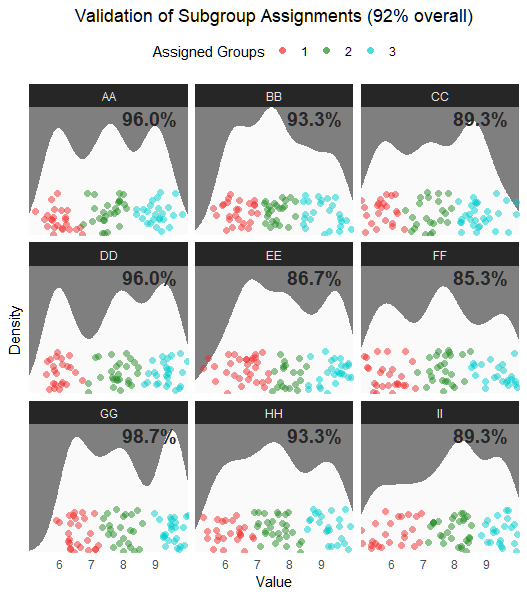
Validation results show accurate subgroup assignments across categories.
You can also generate custom multimodal data with different parameters:
# Generate custom dataset
custom_data <- MultiModalR::create_multimodal_dummy(
  seed = 12,
  n_categories = 6,
  n_per_group = 30,
  n_subgroups = 4
)If you use MultiModalR in your research, please cite the original paper: after publication